
In the frosty, high-stakes world of Whiteout Survival, every second counts – especially when your alliance is howling for backup during a Bear Hunt rally. 🐻❄️ That’s where Troops Formations step in like a total game-changer. Think of them as your personal quick-load presets: save your perfect hero trio, tailor those troop ratios to a T, and then deploy them with one single tap. No more frantic scrolling, no more accidentally sending your gatherer heroes to war. It’s the ultimate \"work smarter, not harder\" move that every savvy player – from casual free-to-play to whale – absolutely needs in their arsenal.
Picture this: you’re chilling, minding your own business, when suddenly 12 rally pings pop up. With pre-saved formations, you can load up Jessie’s squad for rally #1, then Jasser’s for rally #2, Seo-yoon’s for rally #3 – all in a flash. It’s the kind of efficiency that makes your allies say, “Dang, this person’s got their act together!” 💅 So, let’s break down everything about Troops Formations, from unlocking them to setting them up like a pro, because honestly, it's a total no-brainer once you get the hang of it.
🏰 Unlocking Your Formations: The Furnace & VIP Hustle
Your journey to formation mastery starts with upgrading your trusty Furnace. You unlock your very first formation slot at Furnace Level 10, and from there, you can earn up to 10 slots purely by leveling up. Here’s the full roadmap:
| Formation Slot | Requirement |
|---|---|
| 1 | Reach Furnace Level 10 |
| 2 | Reach Furnace Level 13 |
| 3 | Reach Furnace Level 16 |
| 4 | Reach Furnace Level 18 |
| 5 | Reach Furnace Level 20 |
| 6 | Reach Furnace Level 22 |
| 7 | Reach Furnace Level 24 |
| 8 | Reach Furnace Level 26 |
| 9 | Reach Furnace Level 28 |
| 10 | Reach Furnace Level 30 |
| 11 | Activate VIP 5 ⭐ |
| 12 | Activate VIP 8 ⭐ |
Now, about those VIP slots – it’s not enough to just hit VIP 5 or 8. You gotta have your VIP status active. Reaching a new VIP level automatically gives you 1 day of VIP time, but to keep it rolling you can use Gems (10,000 Gems for 30 days of VIP bliss) or snag a pack with real cash. Pro tip: always check your VIP bar before a big event like Bear Hunt – losing those extra formations mid-rally is a major buzzkill.
🔍 How to Get to the Squad Deploy Screen
There are a few slick ways to slide into the setup screen:
-
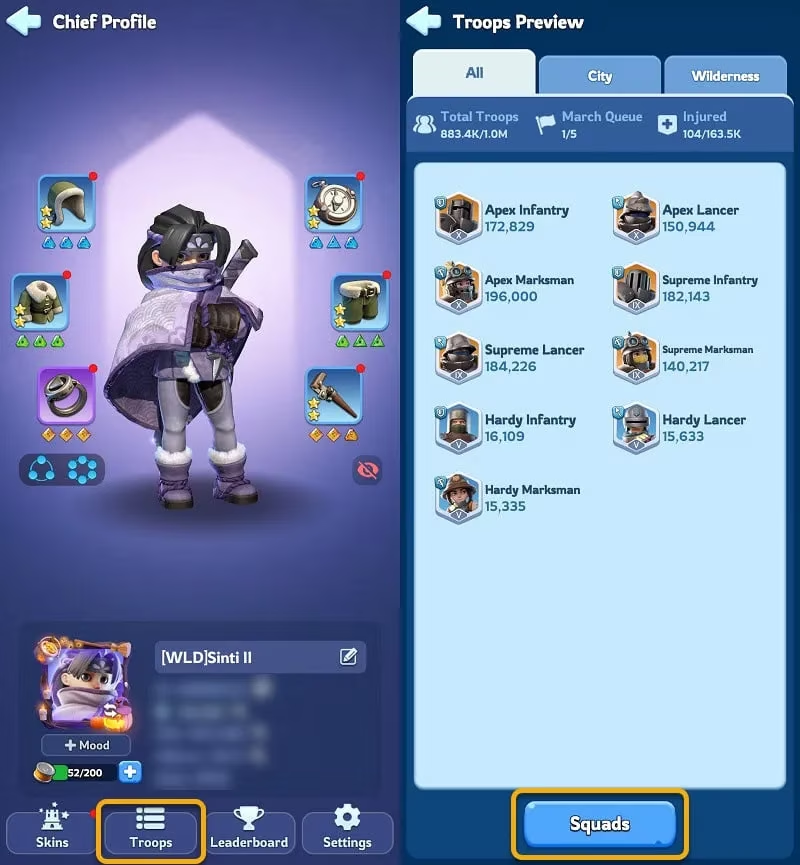
Via your Player Profile → click the Troops tab → then hit the Squads button.
-
Tap any enemy on the map and select Attack – the game will prompt you to set your squad.
-
Click on an empty tile on the ground and choose Occupy. This one’s a sleeper hit for multi-formation setup days.
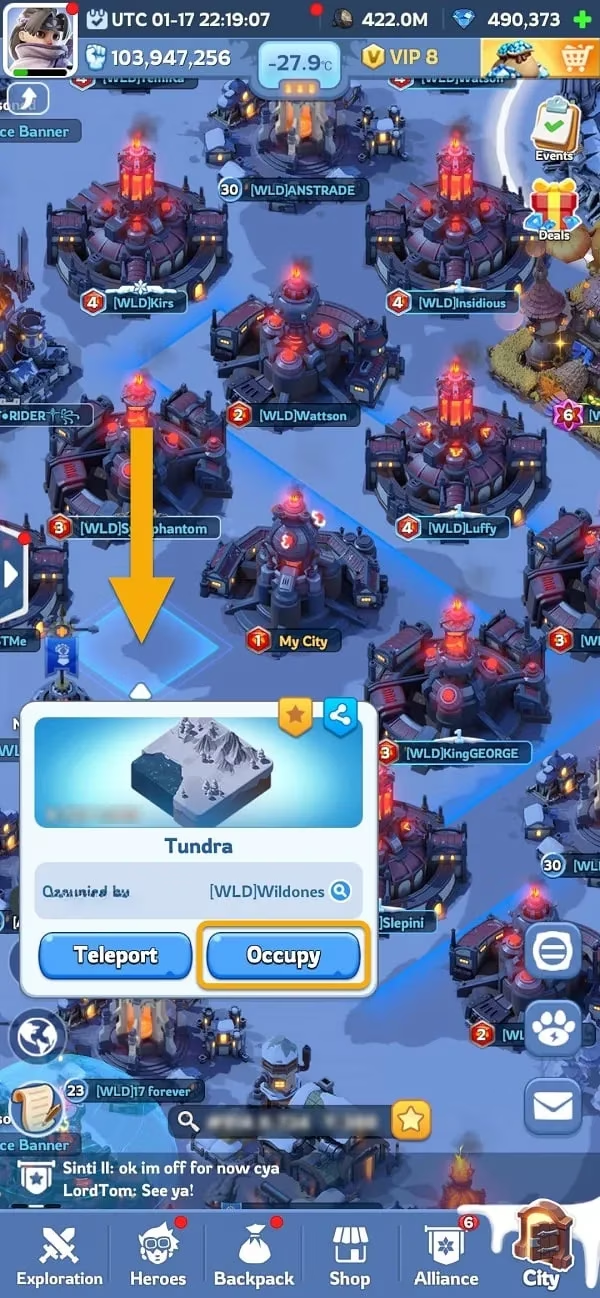
Here’s a hot tip that’ll make your life 10x easier: use the \"empty tile occupy\" method when you need to configure multiple squads. Deploy your first formation, occupy a tile, and then go back – those heroes and troops are now \"used up\" and won’t clutter your options when you’re crafting the next squad. It’s the best way to utilize every single troop and hero across all your formations, especially for Bear Hunt where you might be running 6+ different setups.
🧠 Setting Up a Formation (Without Losing Your Mind)
When you first open the Squad Deploy screen, the game auto-loads heroes based on raw Power – and let’s be real, that order is often trash for synergy. It also defaults to a 33/33/33 Infantry/Lancer/Marksman ratio with your highest-tier troops, which is… fine for some stuff, but definitely not optimal for, say, Beast hunting or Crazy Joe.
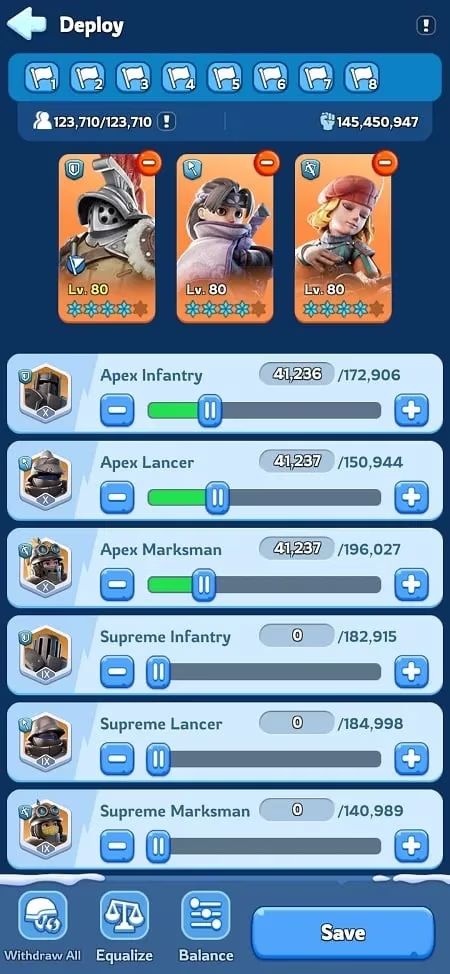
Golden rule: ALWAYS pick your heroes first, then tweak the troops. If you adjust troops and then swap a hero, the troop ratio resets to default because your deployment capacity changed. Total facepalm moment, right? 😩
Here’s how to do it like a boss:
-
Tap the red minus (❌) on the top-right of a hero’s portrait to remove them.
-
Click the empty slot, browse the Select Heroes screen, and tap the hero you want.
-
Hit Assign to lock them in. Repeat for all three positions.
-
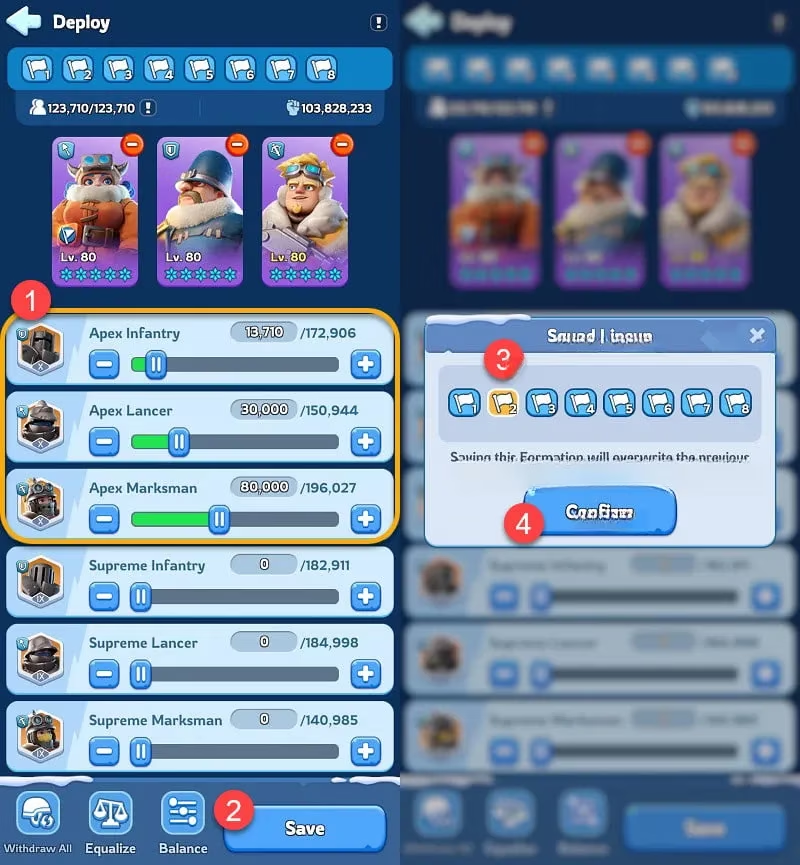
Once your hero lineup is perfect, adjust those troop sliders. For Bear Hunt, many players run something like ~10% Infantry, ~25% Lancers, ~65% Marksmen to maximize damage output while keeping the march durable enough.
-
Click Save, pick a Formation slot (the numbered flags at the top), and hit Confirm.
Boom! Now that setup is immortalized and ready to be loaded with a single tap of that numbered flag icon.
Later in the game, you’ll unlock features like \"Equalize\" and \"Balance\" for troops, but honestly, before you have a gazillion troops, manual tweaking is the way to go. And heads up: when gathering resources on a tile, the game picks your lowest-tier troops by default. In early game, swapping to higher-tier troops gives you more carrying capacity – just tap the troop icons to override. Mid-to-late game it becomes irrelevant, but it’s a neat little optimization for newbies.
🐻 The Ultimate Bear Hunt Formation Cheat Sheet
Ask any seasoned player what they use formations for, and 90% will scream “Bear Hunt!” The pressure’s real – you need to join multiple rallies quickly, each requiring a different hero with a specific buff skill (like Jessie’s 25% damage boost for all troops, or Jasser’s lethality boost). Here’s a real example of a formation lineup from a player who’s been there, done that:
| Formation Slot | Hero Leader | Purpose |
|---|---|---|
| 1 | Your strongest march (order doesn't matter) | Calling your own rally |
| 2 | Jessie | Joiner #1 – damage buff to all troops |
| 3 | Jasser | Joiner #2 – lethality and damage buff |
| 4 | Seo-yoon | Joiner #3 – another damage buff monster |
| 5 | Reina | Joiner #4 – further damage amplification |
| 6 | Gwen | Joiner #5 – beast-specific buffs |
| 7 | Sonya | Joiner #6 – backup buff, if available |
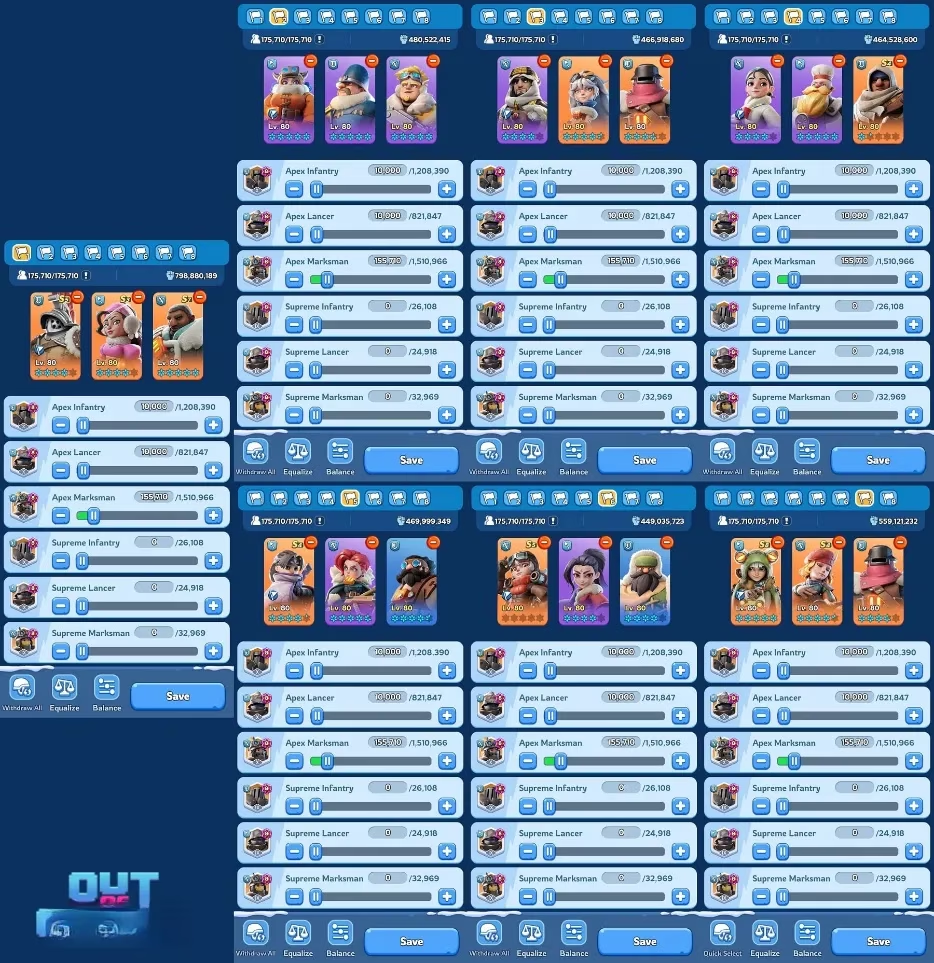
When your rally leader pings, you can just tap the appropriate flag – boom, Jessie’s squad is loaded, troop ratio is on point, and you’re off to melt that bear. It’s the difference between earning a measly 500 gems and racking up 1500+ gems in a single event. 🤑
🚫 “You have heroes with no troops” – Why This Happens
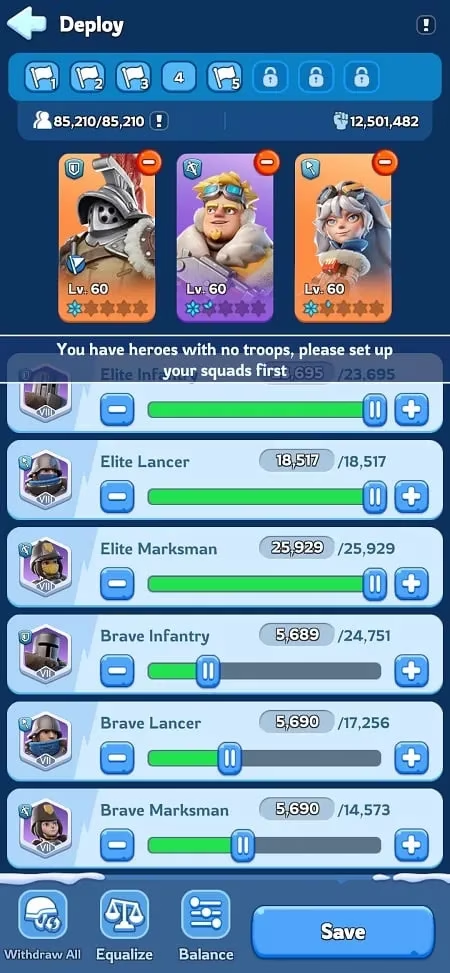
This message is the bane of many players, but it’s super easy to fix. It pops up when you click a formation number that hasn’t been saved yet. You’re trying to load an empty slot! If you click a saved slot (1,2,3,5, etc.), it loads normally. But if you hit an empty one, the game throws that error. So, always make sure you’ve followed the save steps before tapping that flag.
🌟 Final Words of Wisdom
Troops Formations are the unsung heroes of efficient Whiteout Survival gameplay. They let you customize not just for Bear Hunt, but also for Crazy Joe (holding correct heroes and troop counts for reinforcement), for PvP rallies, for daily beast hunting with Gina (so you never forget to bring her stamina reduction), and for gathering – if you’re still in the early-game resource grind. Set them up once, then flex on your alliance mates with your lightning-fast rally joins. Honestly, once you’ve experienced the convenience, going back to manual squadding feels like using a flip phone in 2026. 📱💨
Start with the free slots you earn through Furnace upgrades, and if you’re serious about min-maxing, consider maintaining VIP 8 for those extra 2 formations. They’re clutch when an event demands 6+ unique squads. Now go out there, save those squads, and let your formation game do the talking!
0 Comments